Infinity Player V10.5
A library-and-control release on top of V10 — Invert Phase in Infinity DSP, a Missing Tag menu that fetches metadata for you to review before it writes anything, TrueNOS on the DX340Max, duplicable custom Harmonic profiles, full Amp16 support, a redesigned Now Playing screen, and new Software Volume and Volume Knob controls. All of V10 — HRRAI, Infinity FPGA, Always On Display — is still underneath. For iBasso DX340, DX340Max, DX320MAX, DX270, and DX180.
V10.5 is released through our Discord community first. Join the server to grab the latest build and report feedback.
What V10.5 Adds
Eight new capabilities across the DSP, the library, and the volume path — plus the stability work underneath them.
Invert Phase
Flip the absolute polarity of both channels from Infinity DSP. Some pressings and transfers are cut out of phase — one toggle puts them back, with no change to level or timing. Details →
Missing Tag
A tag-management menu that finds tracks with incomplete metadata, fetches candidates from several sources, and lets you review each field before applying it. Nothing is written to your files until you say so.
TrueNOS on DX340Max
True non-oversampling now runs on the DX340Max — the DSP comes all the way off the factory oversampling path rather than approximating it, the same TrueNOS behaviour the DX340 already had.
Duplicate Harmonic Profiles
Copy any custom Harmonic profile and tune the copy — keep the original as a reference and A/B a variation without rebuilding all nine bands from scratch. DX340 and DX340Max only.
Amp16 Support
Full compatibility for the Amp16 card — detected on boot and given its own amp tuning, alongside the amp modules already supported on the DX340 family.
Queue → Playlist
Save whatever is playing right now as a new playlist in one action — the whole queue, in order, without rebuilding it track by track.
Software Volume & Volume Knob
Two new volume paths — a Software Volume Control for devices and outputs without hardware attenuation, and a Volume Knob Control that maps the physical knob the way you want it.
Tag Details on the Track Popup
Tap a track and the popup now shows its full tag set — every field the file carries, without leaving the list you are browsing.
Redesigned Now Playing
A cleaner Now Playing screen — album art on an ambient glow, DSP and DR chips on one row, format and ReplayGain inline under the seek bar, and a persistent bottom bar. See it →
Playback Stability
The audio thread is dispatched off the main thread, removing a class of UI crashes during playback. The player also resumes at the exact position it was stopped at after a restart.
Fixes
USB-DAC charging fixed, DeepSleep no longer causes a very slow reboot, and Now Playing lays out correctly at large font sizes.
Now Playing, Redesigned
The screen you actually stare at. Everything that used to be buried in a menu or a second page now reads at a glance — without crowding the artwork.
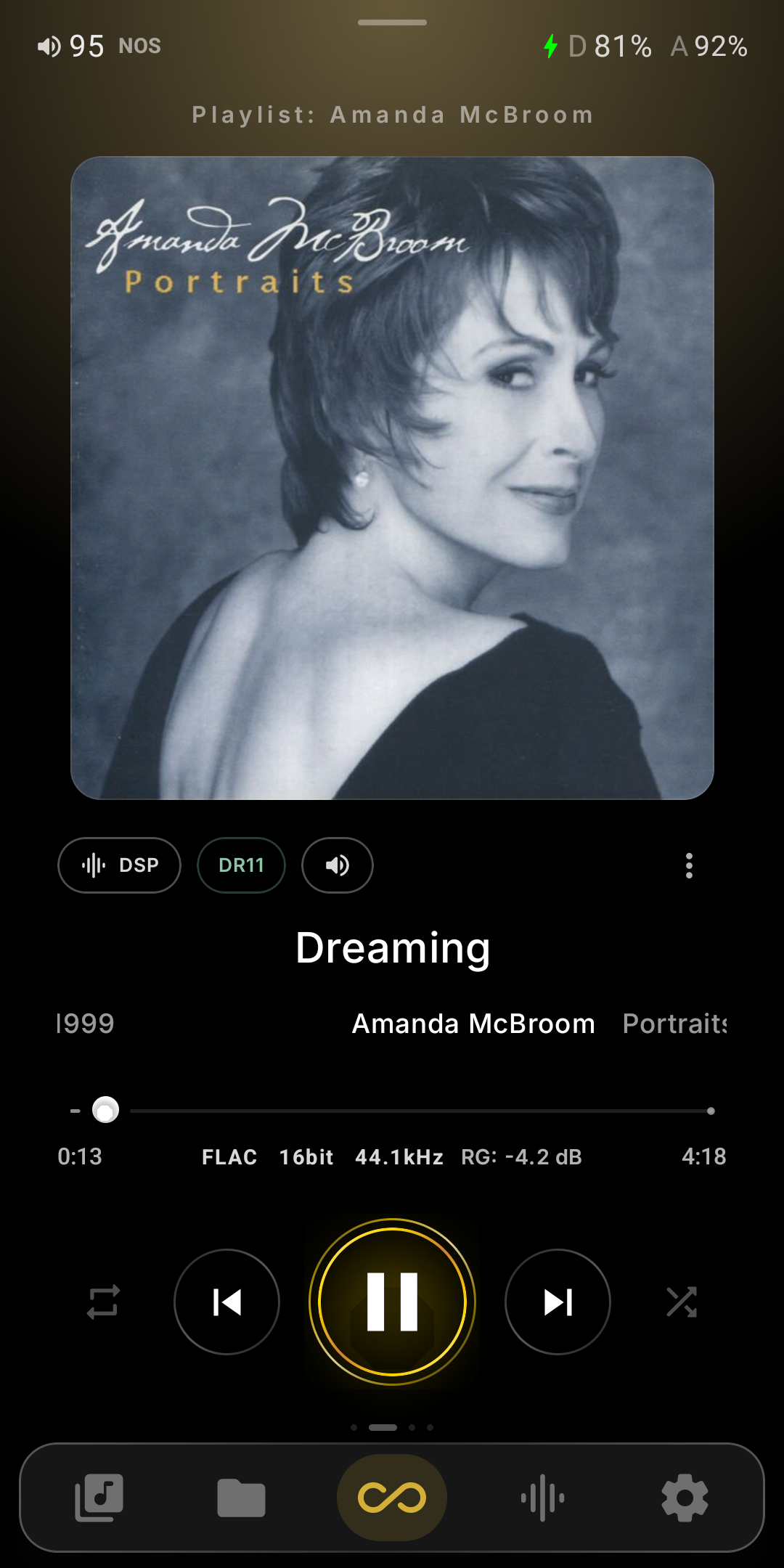
Artwork First
Large rounded album art sitting on an ambient glow pulled from the cover, with the playlist or source you came from named above it.
The Numbers, Inline
Format, bit depth, sample rate and the track's ReplayGain value sit under the seek bar — and DR and DSP ride as chips beside the art, no menu dive.
Status Along the Top
Volume, the current oversampling mode, charging state, and both the digital and analog battery levels on the DX340 family — all on one line.
Reachable Controls
A gold-ringed play control with repeat and shuffle either side, swipeable pages marked by dots, and a persistent bottom bar for library, folders, Infinity, visualizer and settings.
HRRAI — Neural High-Frequency Reconstruction
On-device AI that rebuilds the high-frequency air lost in CD-quality masters. It synthesizes spectral content above 14 kHz — no upsampling, no rate conversion.
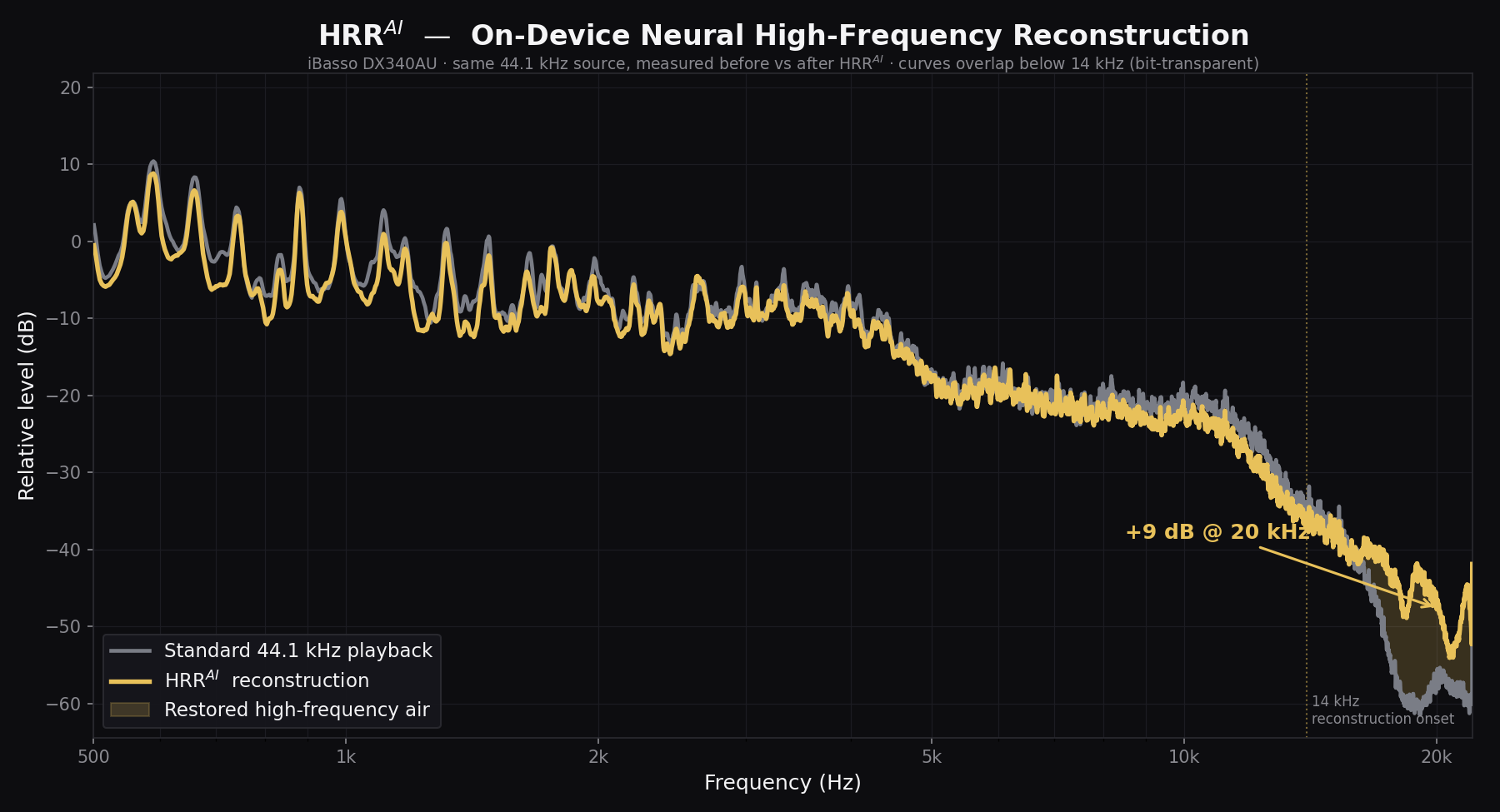
Measured on iBasso DX340AU. Same 44.1 kHz source, before vs after HRRAI — the curves overlap below 14 kHz (bit-transparent).
Runs on the GPU
Entirely on the device's GPU — no cloud, no upload, real-time during playback.
Bit-Transparent Below 14 kHz
It adds spectral content only — everything below 14 kHz passes through untouched, as the measured curves show.
Measured Gain
On the DX340AU: +8 dB at 18 kHz, up to +12 dB at 20 kHz of restored high-frequency energy.
Two Models
HRR (light) and HRReX (full) — auto-selected by the player.
HRRAI engages on 44.1 kHz and 48 kHz sources. Hi-Res and DSD already carry full bandwidth and are passed through untouched. Requires Infinity Pure mode.
Infinity FPGA
Every other tuning on this page happens in software, above the DAC. This one happens inside the FPGA silicon — it reshapes the 1-bit ΣΔ modulator that turns your samples into the signal the discrete DAC reconstructs.
Original
The stock iBasso modulator, untouched — the reference point, and what the player restores whenever you switch back.
Ultimate
Reshapes the stock modulator in silicon for −13 dB THD — a cleaner shaping curve into the same discrete DAC.
Engineered in-house. DX340 and DX340Max only — the DX270's FPGA is a FIR fabric rather than this ΣΔ modulator, and the DX320MAX's and DX180's handle only SPDIF and clocking. More on Infinity DSP →
Always On Display
Docked and playing, the panel turns into a true-black now-playing screen instead of going dark — built for the OLED panel on the DX340 family.
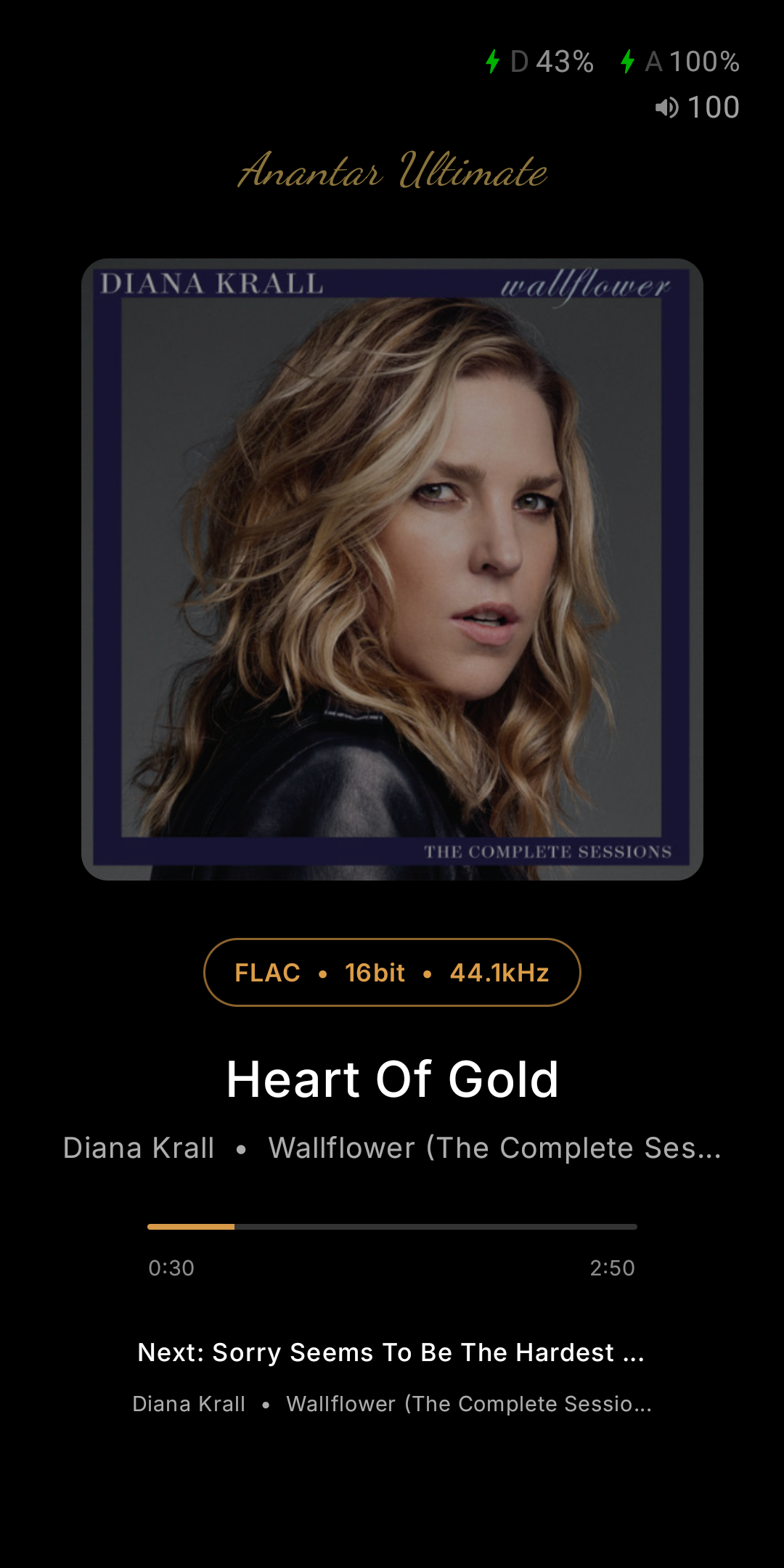
Everything at a Glance
Dimmed album art, title and artist, format, seek position, the next track up, plus battery, charging and output status.
Kind to the Panel
Brightness adjustable from 1–20%, a 60-second pixel shift, and a 5-second position poll so it barely wakes the CPU.
On Your Terms
Auto-activate on charging is on by default; turn it off and AOD engages on battery too. Idle delay and the up-next line are both configurable.
Tap or Hold to Exit
Tap anywhere by default. Switch to hold-to-exit and a gold progress ring fills over 750 ms, so a stray touch in a bag never drops you out.
View-only — the side buttons still control playback. DX340 and DX340Max only.
Two New Devices, and a Smarter Library
iBasso DX320MAX Support
The DX320MAX joins the family — full library, Qobuz and Tidal, Infinity Stage, kernel boot profiles, AutoEQ, PEQ and ReplayGain, plus Infinity Pure, with its digital filters and amp gain mapped to its own hardware. Its DAC board has no DSP path, so the Infinity DSP cores stay hidden. Full matrix →
iBasso DX180 Support
The DX180 joins the family — full library, Qobuz and Tidal, Infinity Stage, kernel boot profiles, AutoEQ, PEQ and ReplayGain, plus Infinity Pure, with its digital filters and amp gain mapped to its own hardware. Its DAC board has no DSP path, so the Infinity DSP cores stay hidden. Full matrix →
DR14 Dynamic Range
Offline crest-factor analysis matching the foobar2000 DR meter, for every format the player decodes — including DSD, ALAC and FLAC. Sort and filter by DR, see it on list rows and Now Playing, and let AI Mix build a High Dynamic Range playlist.
Last.fm
Connect in-app to scrobble, share now-playing, and keep loved tracks in two-way sync. Your listening history then weights the AI mixes, and More Like This surfaces similar artists you already own.
Display Gestures
Double-tap to wake and a two-finger double-tap to sleep — screen on and off without reaching for the power button. All display settings now live on one page.
Built on V9.6
The foundation V9.6 builds on — the biggest Infinity Player release yet. The deeper hardware features remain tied to the device family that supports them.
DSD Remaster Engine
Remaster any PCM track to DSD512 in real time, on-device, with five DSD Engine modes to tune the character. Available on DX340, DX340Max, and DX270.
Infinity Pure
Pure Player and native EXT4 are now unified into a single Infinity Pure mode, with a kiosk-style OS experience that keeps the system lock screen. One mode, the whole purist signal path.
Read the Pure Player breakdown →Analog Coloration
Vinyl, Tube, and Chassis Lover coloration profiles — promoted out of experimental. Add the character of vinyl warmth or tube bloom on top of your source.
Radio Paradise
Built-in Radio Paradise with Block and Live modes, a dynamic multi-channel list (including KFAT and Radio 2050), and offline caching of track metadata and artwork.
Bluetooth & USB DAC
New Bluetooth DAC mode with an in-app pair manager, plus USB DAC Mode A (host with an external DAC) and Mode B (the player as a USB sound card).
Redesigned Now Playing
A full-screen Now Playing with swipeable pages, DSP chips, and a VU Meter — including a twin-needle vinyl view. Paired with a 4-question Tuning Wizard that bundles your choices into a single reboot.
Power & Output
A reorganized Anantar Ultimate panel with Sound, Power, and Output tabs, an Idle Power-Off timer, and a "Stop Charging at 80%" battery-saver toggle.
Stability & Speed
Large-library out-of-memory fixes, faster boot, hardened wake-from-sleep, Tidal auto-resume fixes, and many side-button and queue reliability improvements.
Get V10.5 on Discord
V10.5 is distributed through our Discord community. Join to download the latest build, get install help, and share feedback.
💬 Join the Anantar Ultimate Discord