What Infinity Pure does
One owner of the DAC
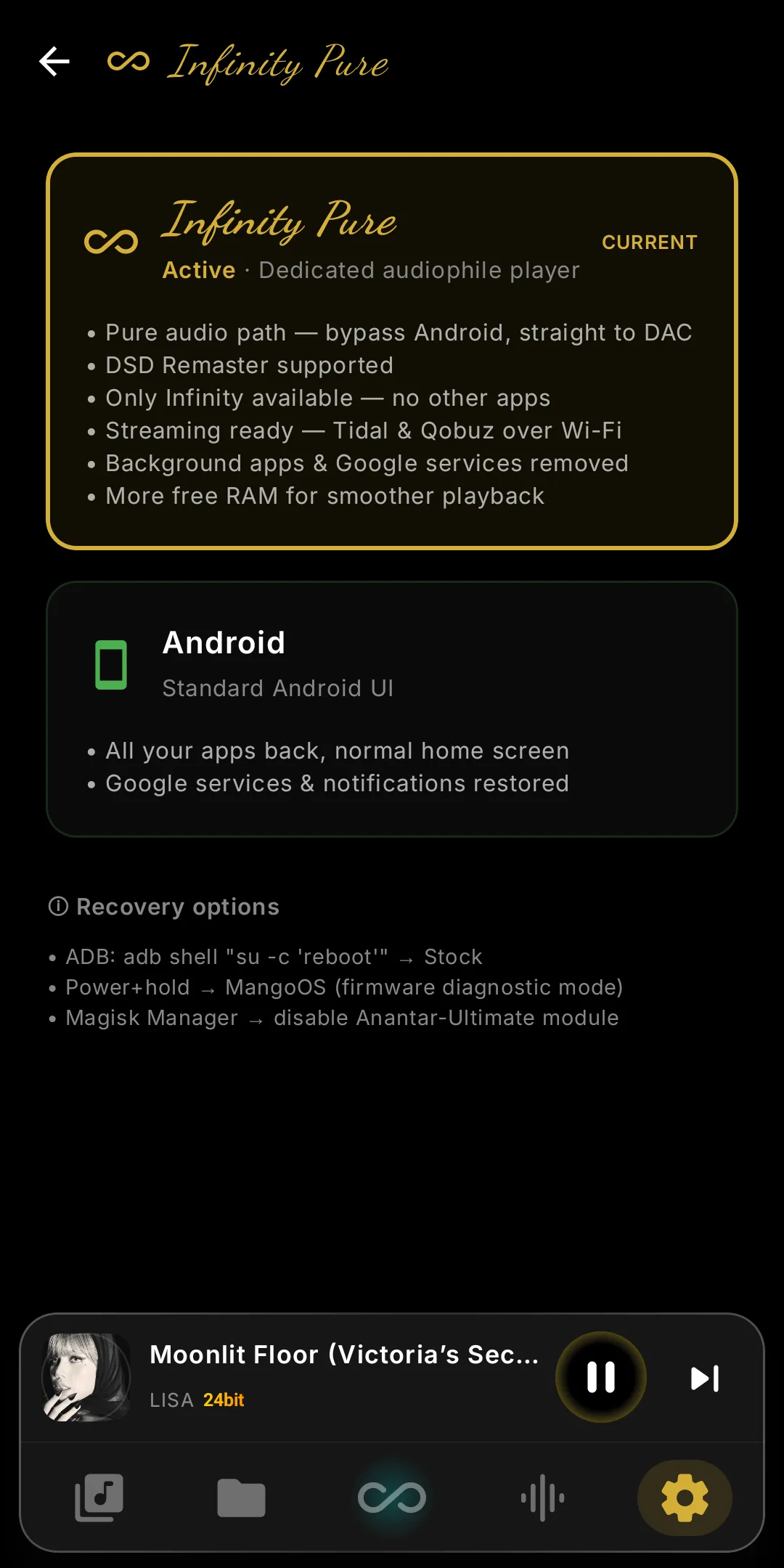
Infinity Player takes the audio device end-to-end. The Android audio server, the mixer every app normally uses, is bypassed, so your file's bits reach the DAC untouched.
The Pure-only engines
DSD Remaster and HRRAI need this path and run only here. Tube, Vinyl, Chassis, Crossfeed and Parametric EQ work in both modes.
Nothing else running
Other apps, background services and notifications are removed while it is on — one process, one job — which also frees memory for smoother playback.
Wi-Fi stays, USB DAC does not
Tidal and Qobuz, Internet Radio, UPnP/DLNA, WiFi Transfer and Rsync all keep working. USB DAC output and Bluetooth audio are unavailable — the internal DAC belongs to the player alone.
Android mode is the other card on the same screen: the standard Android UI with every app back. Switching either way is one reboot.
Switch it on, switch it off
- Turn it on: Infinity Player › Settings › Infinity Pure › tap the Infinity Pure card. The DAP reboots once and comes back with the player owning the DAC.
- Turn it off: the same screen › tap the Android card. Another reboot, and the DAP is an ordinary Android device again.
When to turn it on, when to turn it off
- Turn it ON if the DAP is mainly a dedicated player, one track at a time, and you want a deterministic, bit-perfect path with no software volume losses.
- Turn it OFF if you need a USB DAC, Bluetooth audio, notification sounds or video apps — anything where another app or device has to share the audio path.
- You can leave it on permanently on a device used only for music; that is what most listeners do. The reboot is a one-time cost.
- If switching from another music app, wait about three seconds before tapping Play; the kernel needs that long to release the audio device.
- The network stays on. Since V12, UPnP/DLNA, Internet Radio, WiFi Transfer, Rsync and streaming all work in Infinity Pure. Local Mode alone turns Wi-Fi off, for offline listening.
- Not every DAP gets the same extras. On DX320MAX and DX320, Pure runs Tube, Vinyl, Chassis, Crossfeed and Invert Phase, but not HRRAI or DSD Remaster. Device matrix →
- If something sounds wrong (silent, noisy, distorted), turn Infinity Pure off, reboot and retry. If the problem goes, it's in the Infinity Pure path; if not, it's elsewhere.
Want the why?
How the audio device is handed over, what the diagnostics prove, and how it compares with Neutron and USB Audio Player Pro.
→ Read the deep dive