Infinity OS
Your DAP, only a music player. Infinity OS starts straight into Infinity Player with no Android underneath: the whole system feels much faster and the sound steps up another level. Every Anantar Ultimate feature stays: Infinity DSP, Personal Hearing, Qobuz, TIDAL, and now Roon.
Faster. And it sounds better.
Switch once and you feel it in the first minute — as if you had bought a new DAP.
Much faster, everywhere
It starts straight into your music, and every page, list and button answers right away. Less waiting, smooth scrolling, from Home to Now Playing.
Sound, one level up
With nothing else running beside the music, the DAP's DAC and amp have the whole system to themselves. The sound comes out cleaner and more open, a clear step up from Android.
A fourth way to start your DAP
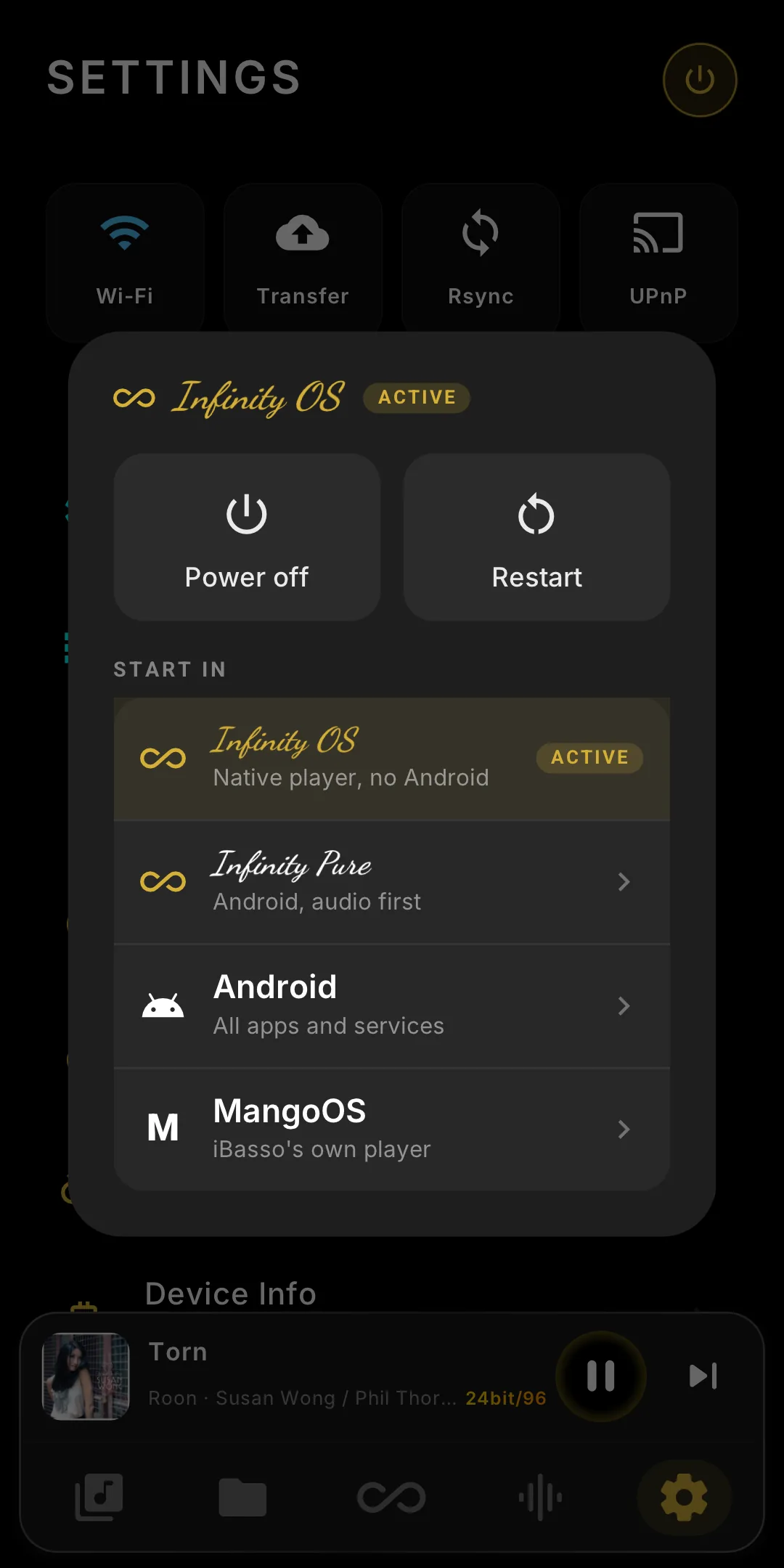
Infinity OS is Infinity Player running as the DAP's whole system. Pick it in the power menu and the DAP restarts into a player that does one thing: play music. There are no Android apps or services running behind it.
It looks and works like Infinity Player and shares everything with it: your library, playlists, favourites, settings, Listening Profiles and Personal Hearing results. Switch between modes whenever you like; nothing is lost.
- Infinity OSNative player, no Android. Lightest, fastest to music.
- Infinity PureAndroid, audio first. Choose it for Bluetooth headphones.
- AndroidAll apps and services, Infinity Player as one app among others.
- MangoOSiBasso's own player (not on DX180).
Lighter than iBasso's own Pure mode
Fewer things running in the background leaves the DAP to the music. The same DX340, a minute after start-up, nothing playing:
| System | Programs running | Free memory |
|---|---|---|
| iBasso MangoOS | 118 | 6.73 GB |
| iBasso Pure | 75 | 7.08 GB |
| Infinity OS | 63 | 7.15 GB |
The player itself uses about 105 MB of memory, against about 494 MB for iBasso's MangoPlayer. Measured on one DX340 (October 2026); your numbers move a little with settings and library size.
Switch to Infinity OS — and back
Infinity OS comes with Anantar Ultimate V13. No reinstall, no reset.
- Update to Anantar Ultimate V13. V13 is on the Beta channel for now: Settings › Anantar Ultimate Update, pick Beta and install. Beta stays Beta until the next Stable. How to update →
- Open the power menu. Settings › the power button at the top right (holding the DAP's power key opens it too).
- Under START IN, tap Infinity OS, then tap again to confirm. The DAP restarts.
- Play. Your library, playlists and settings are already there. Pressed Play while it was starting? The music begins on its own when the DAP is ready.
- Going back works the same way: power menu › START IN › Infinity Pure, Android or MangoOS. A plain Restart keeps you in Infinity OS.
Everything you use in Infinity Player
Rebuilt to run on its own, with the same screens and the same sound settings your model supports. Tap a screenshot to enlarge it.
Sound
- Infinity DSP: DSD Remaster, HRR, DSD to PCM, Vinyl, Tube, Chassis, Crossfeed, Invert
- Personal Hearing: Ear Match, the hearing test and your audiogram, per IEM
- EQ, Parametric EQ, AutoEQ headphone search, ReplayGain (track or album)
- Listening Profiles, Harmonic, Sound Profile, Tuning Wizard
- A short fade-in when you resume a paused song
Playback
- Native DSD, WavPack DSD as true DSD, 32-bit FLAC, CUE sheets
- Gapless playback
- Lyrics, the queue, tap the progress bar to seek
- Play counts and favourites shared with Infinity Player
Library
- Albums, artists, genres, years, folders, playlists
- Covers from your files first, online artwork when missing
- Fast search, Japanese kana included
- AI mixes on Home, refreshed through the day
Streaming & network
- Qobuz and TIDAL: discover, your music, search, radio, Autoplay
- Internet radio, Last.fm, online lyrics
- UPnP / DLNA, WiFi Transfer and Rsync
- Roon — see below
- PGGB, HQPlayer and Spotify Connect — see below
Outputs
- USB DAC: plug in an external DAC, DSD native or DoP
- Bluetooth DAC: play from your phone or computer through the DAP's DAC and amp (LDAC, AAC, SBC)
- Amp cards, Line Out, SuperGain and gain, the same as Infinity Player
Screen & buttons
- VU meters: Original, Yamaha, Vinyl, DR
- Always-On Display, Night Light
- Swipe right to go back, following your finger, on every page
- Side buttons and volume knob your way; a slim volume card while you turn it
Roon, on your DAP
Pick your DAP in Roon on your computer or phone and it plays through the DAP's DAC and amp. Your Roon library, Qobuz and TIDAL in Roon, Roon Radio: all of it, on the DAP in your pocket or on your desk.
- Bit-perfectRoon's audio reaches the DAC untouched: PCM up to 768 kHz, and DSD up to DSD512 as native DSD.
- Your sound settings still applyInfinity DSP and Personal Hearing work on Roon too, when they are on.
- Now Playing shows RoonSong, cover, Roon's queue; Play, Pause, Next, seeking, shuffle and repeat on the DAP control Roon.
- Plays in step with your other zonesGroup the DAP with other Roon zones and they stay together.
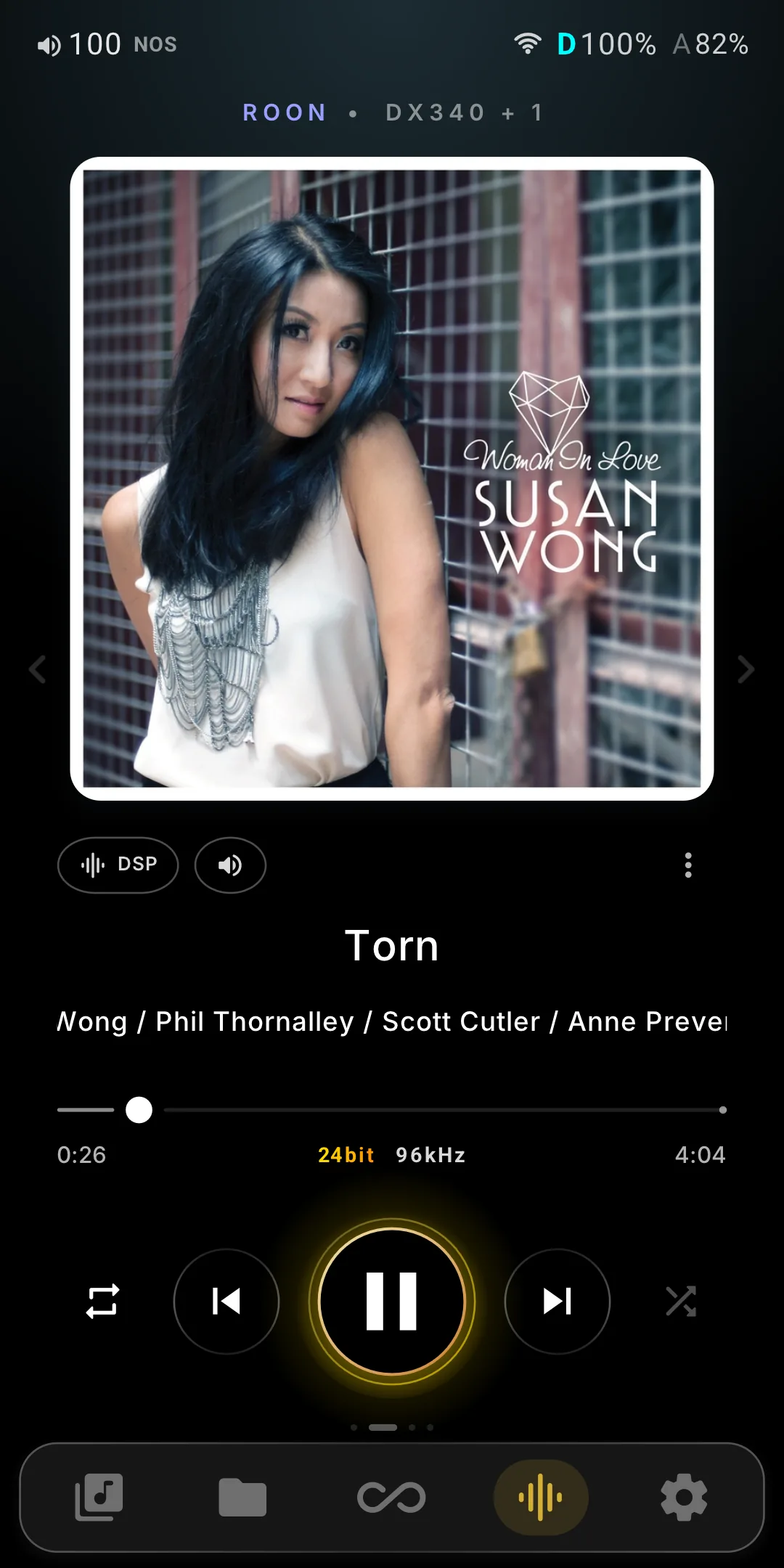
How it works — tap to enlarge.
Roon in five steps
You need Roon (with a Roon subscription) running on a computer or a Nucleus on the same Wi-Fi as the DAP.
- On the DAP: Anantar Ultimate › Output › Roon, and turn it on.
- Install once. The first time, the DAP downloads Roon Bridge, Roon Labs' own software, about 95 MB over Wi-Fi (about 450 MB once installed). It takes under a minute on a good connection.
- In Roon: Settings › Audio. Your DAP shows up under its model name; enable Infinity OS and give the zone a name.
- For Now Playing and the DAP's buttons: Roon › Settings › Extensions, enable Infinity OS (your DAP).
- Play. Pick the zone in Roon. The Roon page on the DAP ticks each step off as it is done, so you can see what is missing.
5 — Roon's own signal path reads Lossless all the way to the DAP.
Recommended in Roon's device setup
| Setting | Choose | Why |
|---|---|---|
| Volume Control | Device Volume | Roon's volume slider moves the DAP's own volume, and the DAP's knob moves Roon's slider. The music stays bit-perfect. |
| DSD Playback Strategy | Native DSD | Set for you: DSD64 to DSD512 play as native DSD. DoP works too, up to DSD128. |
Roon or the DAP — never both
When Roon starts playing, the DAP's own player pauses. Pick a song on the DAP and Roon pauses. Press Play in Roon to take the DAP back.
Group sync
The DAP tells Roon how long its sound takes to come out, so grouped zones play together. If it still sounds a touch behind or ahead of your speakers, press Sooner or Later on the Roon page until the echo is gone.
Off until you want it
Roon is off by default and nothing is downloaded until you turn it on. While it is on, Deep Sleep waits so Roon can always find the DAP. Remove Roon Bridge at the bottom of the Roon page frees the space again. What goes online is listed on our privacy page.
Roon and Roon Bridge are products of Roon Labs. Infinity OS runs Roon Labs' free Roon Bridge; the DAP is not a Roon Ready certified device. Tested on DX340MAX; see the model list below.
PGGB, HQPlayer and Spotify, too
Three more ways to play through the DAP's DAC and amp. Find them in Anantar Ultimate › Output. One network source plays at a time, and they switch off while Wi-Fi is off.
PGGB
Plays the upsampled music from PGGB-Live on your computer. It reaches the DAC untouched, DSD as true DSD. Now Playing shows PGGB's song, cover and queue, and the DAP's buttons control PGGB. The first time you switch it on, the DAP downloads a small helper (about 2 MB).
HQPlayer
The DAP becomes a Network Audio Adapter for HQPlayer on your computer: in HQPlayer, choose NetworkAudioAdapter. Music reaches the DAC untouched, DSD as true DSD. Now Playing shows HQPlayer's song, cover and playlist; to control HQPlayer from the DAP, press HQPlayer's “Allow control from network” button. The first time you switch it on, about 3 MB is downloaded.
Spotify Connect
Pick the DAP in the Spotify app and it plays at the best quality your account has, lossless included. You need Spotify Premium and your own free Spotify Soloist API key from Spotify for Developers; the Spotify page on the DAP shows a QR code so you can paste the key from your phone. Now Playing shows song, cover and queue; the DAP's buttons, shuffle and repeat control Spotify, and Spotify's volume slider moves the DAP's volume. The first time you switch it on, about 15 MB is downloaded.
Works on DX340, DX340MAX, DX270, DX180 and DX260MK2. All three are off by default and nothing is downloaded until you turn one on; what goes online is listed on the privacy page. PGGB, HQPlayer and Spotify are products of their owners; the DAP is not a certified device.
Which DAPs run it
| DAP | Infinity OS | Roon |
|---|---|---|
| DX340 | ✓ | ✓ |
| DX340MAX | ✓ | ✓ |
| DX270 | ✓ | ✓ |
| DX260MK2 | ✓ | ✓ |
| DX180 | ✓ | ✓ |
| DX320 | ✓ | not yet |
| DX320MAX | ✓ | not yet |
Tested most on DX340 and DX340MAX. Bluetooth DAC is tested on DX340 and not yet available on DX320 / DX320MAX. On DX180 with firmware 1.05, DRE and FIR Output are in Anantar Ultimate › Standard. Something not right on your model? Tell us on Discord.
Questions
Do I lose my library or settings when I switch?
No. Infinity OS and Infinity Player use the same library, playlists, favourites, play counts and settings. The library is not scanned again.
Can I go back to Android?
Any time: power menu › START IN › Infinity Pure, Android or MangoOS, and the DAP restarts there.
Does it sound different from Infinity Player?
Both use the same sound settings, Infinity DSP and Personal Hearing. Infinity OS simply has far less running beside the music.
Do Qobuz and TIDAL work?
Yes: discover, your music, search, radio and Autoplay, at the quality you choose.
Do I need Roon to use Infinity OS?
No. Roon is an option for people who already use it. Leave it off and nothing about Roon is installed.
My DAP does not appear in Roon.
Check that the DAP and the Roon computer are on the same Wi-Fi and Local Mode is off, then look in Roon › Settings › Audio under the DAP's model name. The Roon page on the DAP shows which step is still open.